Gemini 2.5 Flash – 谷歌推出的最新 AI 推理模型
发布日期:2025-04-25
Gemini 2.5 Flash是什么 Gemini 2.5 Flash 是 Google 推出的高效、低延迟的最新...

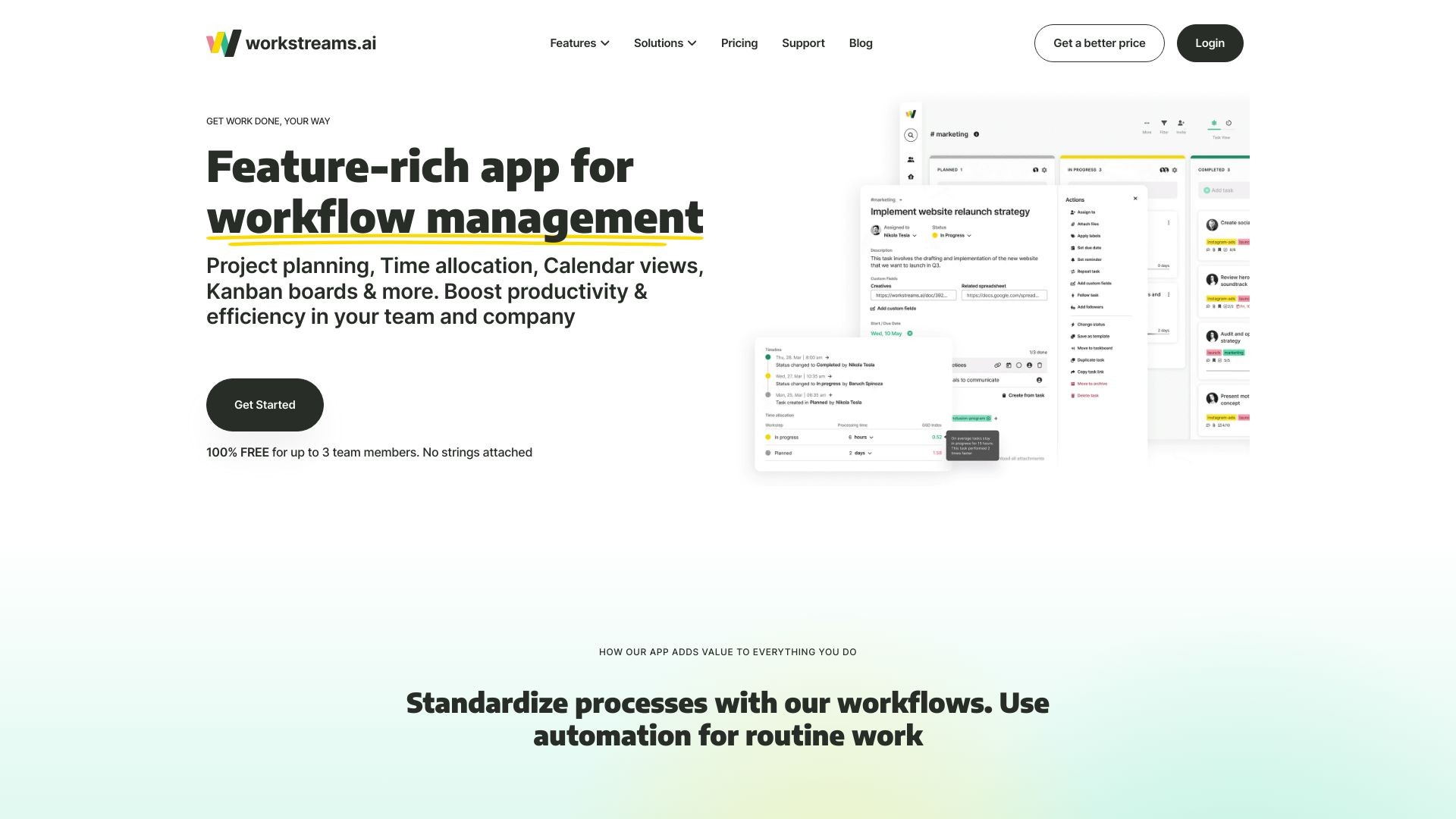
Workstreams.ai is a tool that helps teams collaborate and streamline projects effectively.
发布日期:2025-04-25
Gemini 2.5 Flash是什么 Gemini 2.5 Flash 是 Google 推出的高效、低延迟的最新...
发布日期:2025-04-25
atypica.AI是什么 atypica.AI 是专注于商业研究的智能体框架,通过语言模型快速...
发布日期:2025-04-25
BrowseComp是什么 BrowseComp 是 OpenAI 开源的用于评估 AI Agent网络浏览能力...
发布日期:2025-04-25
大学搜题酱是什么 大学搜题酱是作业帮旗下针对大学生的AI学习助手,具备多种功...
发布日期:2025-04-25
Krea Stage是什么 Krea Stage 是 Krea 推出的全新 AI 工具,将 2D 图像快速转换...
发布日期:2025-04-25
Pollo AI是什么 Pollo AI 是新加坡公司 HIX.AI 开发的多模态人工智能视频生成工...
发布日期:2025-04-25
Pika Twists是什么 Pika Twists 是 Pika Labs 推出的 AI 视频编辑功能,能让用...
发布日期:2025-04-25
AI Mate是什么 AI Mate 是多功能的AI助手应用,提供丰富的内容创作和办公辅助功...
发布日期:2025-04-25
小布助手是什么 小布助手是OPPO推出的智能语音助手,内置在OPPO、一加、真我rea...
发布日期:2025-04-25
The AI Scientist-v2是什么 The AI Scientist-v2 是 Sakana AI 、不列颠哥伦比...
What is Workstreams.ai?
Workstreams.ai is an intuitive task and workflow management tool that allows teams to collaborate effectively and streamline their projects. It provides a visual project management platform that inspires teamwork and improves productivity.
How to use Workstreams.ai?
To use Workstreams.ai, follow these steps:
1. Sign up for a free account on the website.
2. Create a new project or choose a template from the workflow library.
3. Add team members and assign tasks to them.
4. Use the Kanban board to visualize the workflow and track progress.
5. Set up automation rules to streamline routine tasks.
6. Collaborate with team members within the app or integrate with Slack or Microsoft Teams.
7. Use the in-app calendar to schedule and prioritize tasks.
8. Monitor task completion times and identify bottlenecks for process improvement.
9. Customize the app to fit your team's specific needs and preferences.
10. Enjoy improved teamwork, communication, and productivity.
Workstreams.ai's Core Features
Time Allocation: Track the time spent on each task and compare completion times for process improvement.
In-App Calendar: Plan and schedule tasks using the monthly, weekly, and daily calendar views.
Frozen Tasks: Visualize and prioritize tasks that have been stuck or stagnant for a while.
Workflows: Standardize processes using pre-built workflows or create your own custom workflows.
Kanban Boards: Organize tasks visually using the Kanban board, improving workflow agility and productivity.
Automation: Automate repetitive tasks to save time and increase efficiency.
Team Collaboration: Communicate and collaborate with team members within the app or integrate with Slack and Microsoft Teams.
Ownership & Control: Assign ownership and responsibility for tasks to ensure clear accountability.
Templates: Save time by creating task templates for recurring projects or processes.
Goals: Align and motivate your team with clear goals and objectives.
GetStuffDone Index: Track time allocation and task completion to improve performance.
Integration: Seamlessly integrate with Slack and Microsoft Teams for enhanced collaboration.
Task Creation: Create tasks within Workstreams.ai or directly from Slack and Microsoft Teams channels.
Task Delegation: Easily delegate tasks to team members and track their progress.
Real-time Data Tracking: Monitor project progress and performance in real-time.
Customizability: Customize the app to fit your team's specific needs and preferences.
Workstreams.ai's Use Cases
#1
Marketing: From campaign planning to content creation and reporting, Workstreams.ai provides a full 360 marketing operation.
#2
HR Management: Streamline HR and recruiting processes including applicant tracking, hiring, onboarding, and employee retention.
#3
Customer Support: Keep track of customer feedback, bug reports, feature requests, and releases for exceptional customer experience management.
#4
IT Development: Manage development-related processes such as bug tracking, feature development, and release management.
#5
Project Management: Plan, organize, and track projects with clear goals, deadlines, and task assignments.
FAQ from Workstreams.ai
Can I integrate Workstreams.ai with Slack or Microsoft Teams?
How can Workstreams.ai help improve productivity?
Is there a free trial available?
Can I customize the app to fit my team's specific needs?
What is the GetStuffDone index?
Workstreams.ai Support Email & Customer service contact & Refund contact etc.
More Contact, visit
the contact us page(https://www.workstreams.ai/contact/)
Workstreams.ai Company
Workstreams.ai Company name:
workstreams.ai
.
More about Workstreams.ai, Please visit
the about us page(https://www.workstreams.ai/our-team/)
.
Workstreams.ai Login
Workstreams.ai Login Link:
https://app.workstreams.ai/sign-in
Workstreams.ai Sign up
Workstreams.ai Sign up Link:
https://app.workstreams.ai/sign-up
Workstreams.ai Pricing
Workstreams.ai Pricing Link:
https://www.workstreams.ai/pricing/
Workstreams.ai Youtube
Workstreams.ai Youtube Link:
https://www.youtube.com/channel/UCJBa8JcSF2wd2jMJgIjhQTQ
Workstreams.ai Linkedin
Workstreams.ai Linkedin Link:
https://www.linkedin.com/company/workstreams-ai/
Workstreams.ai Twitter
Workstreams.ai Twitter Link:
https://twitter.com/WorkstreamsAI
Workstreams.ai Instagram
Workstreams.ai Instagram Link:
https://www.instagram.com/workstreams.ai/