What is Toolsmart Free Humanize AI?
Why Toolsmart Free Humanize AI?
AI writing is powerful, but often lacks that natural, human touch. Toolsmart Free Humanize AI gives your content the fluency, tone, and polish it needs to sound like it came from a real person—not a machine.
Key Features:
1. Natural Human-Like Rewriting – Transforms awkward or robotic text into clear, smooth language while keeping your original meaning intact and improving overall readability.
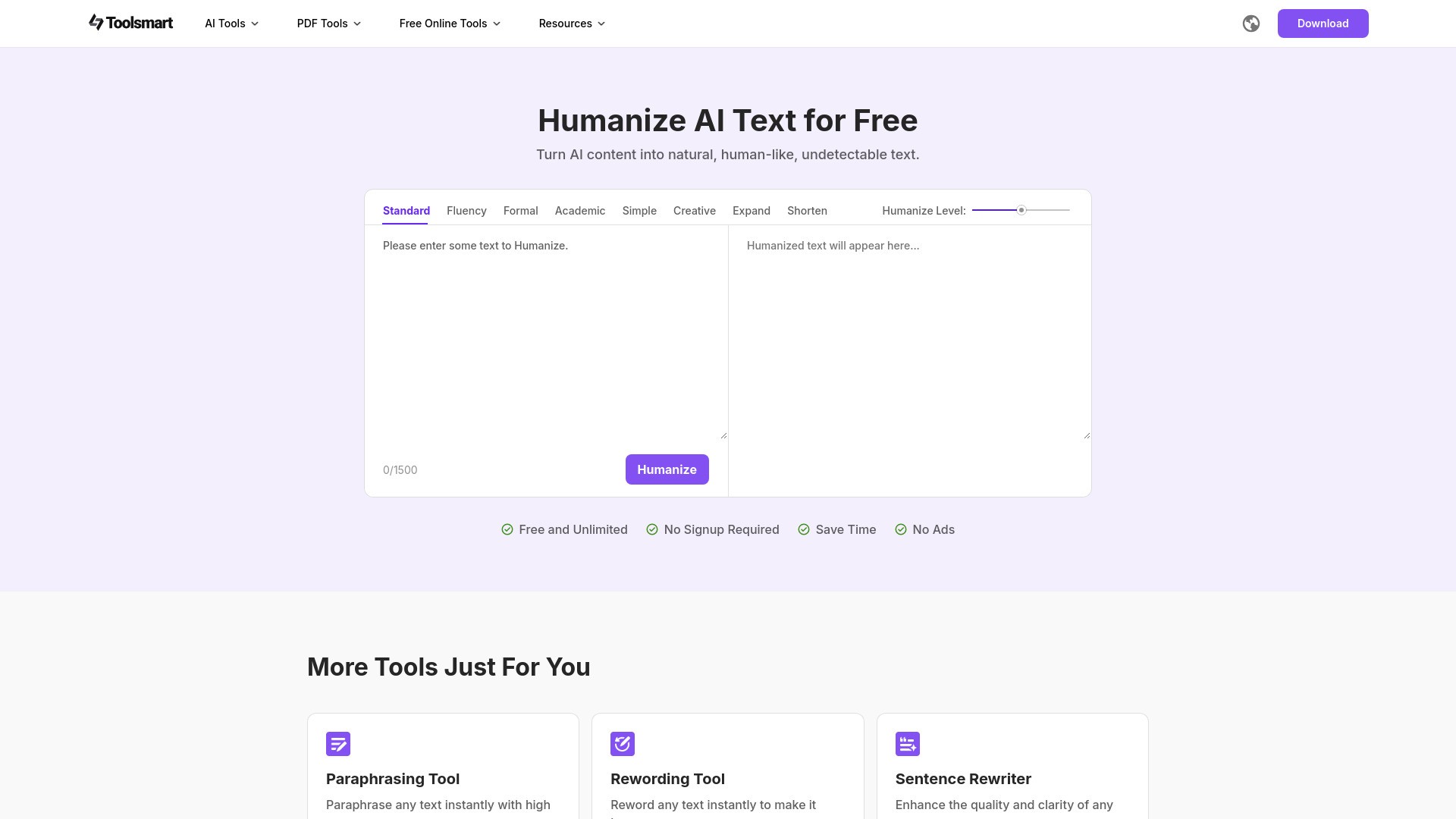
2. 8 Humanizing Modes – Choose from Standard, Fluency, Formal, Academic, Simple, Creative, Expand, and Shorten to match your writing style and intent.
3. Adjustable Polishing Level – Control how natural or transformative the rewrite is—from light touch-ups to full rewrites.
4. 100% Free & Unlimited – Edit up to 1500 words per session with no sign-up, no ads, and no limits—ever.
Why You'll Love It:
1. Makes AI-generated content sound natural and human
2. Ideal for marketers, students, bloggers, and AI tool users
3. Clean interface with instant results
4. No usage caps, logins, or distractions
Use Cases:
Whether you're editing blog posts, marketing copy, academic writing, or chatbot outputs—Free Humanize AI helps you bridge the gap between AI and human expression. Try it now and give your AI content a real voice!
How to use Toolsmart Free Humanize AI?
1. Visit the Website
Go to the official Toolsmart Humanize AI page in your web browser.
2. Input Your Text
Paste or type the text you want to humanize into the text box. The tool supports up to 1500 characters per session.
3. Choose a Mode
Select one of the eight available rewriting modes, including standard, fluency, formal, academic, simple, creative, expand and shorten.
Each mode offers a different style of rewriting based on your needs.
4. Set the Humanize Level
Choose how closely the rewritten text should resemble the original. A higher similarity retains more of the original phrasing, while a lower one rewrites it more freely.
5. Click the “Humanize” Button
After setting the mode and similarity level, click the Humanize button to process your text.
6. Review and Copy the Output
The humanized text will appear shortly. Review it, and if satisfied, copy it for your intended use.
Toolsmart Free Humanize AI's Core Features
Natural Human-Like Rewriting: Transforms awkward or robotic text into clear, smooth language while keeping your original meaning intact and improving overall readability.
8 Humanizing Modes: Choose from Standard, Fluency, Formal, Academic, Simple, Creative, Expand, and Shorten to match your writing style and intent.
Adjustable Polishing Level: Control how natural or transformative the rewrite is—from light touch-ups to full rewrites.
100% Free & Unlimited: Edit up to 1500 words per session with no sign-up, no ads, and no limits—ever.
Toolsmart Free Humanize AI's Use Cases
#1
Make AI-generated blog posts or video scripts sound authentic and engaging.
#2
Polish essays, reports, or summaries that were drafted with AI tools for a more natural academic tone.
#3
Humanize product descriptions or ad copy for better audience connection.
FAQ from Toolsmart Free Humanize AI
What types of text can I improve with Humanize AI?
Can I try Humanize AI for free?
Is my data safe with Humanize AI?
Can Humanize AI help with creative writing?
Can I use Humanize AI on mobile devices?
Toolsmart Free Humanize AI Support Email & Customer service contact & Refund contact etc.
More Contact, visit
the contact us page()
Toolsmart Free Humanize AI Company
Toolsmart Free Humanize AI Company name:
WPS SOFTWARE PTE. LTD.
.
Toolsmart Free Humanize AI Company address:
6 Raffles Quay #14-06 Singapore (048580)
.
More about Toolsmart Free Humanize AI, Please visit
the about us page(https://www.wps.com/about-us/)
.
Toolsmart Free Humanize AI Login
Toolsmart Free Humanize AI Login Link:
Toolsmart Free Humanize AI Sign up
Toolsmart Free Humanize AI Sign up Link: