What is Syntetica?
Syntetica is a tool intended for the production of specialized texts and the management of various types of files using generative artificial intelligence (AI).
The development of Syntetica arises in response to some limitations inherent to chatbots based on LLM, such as the loss and contamination of context, the destructive regeneration of content and the requirement for constant micro-coordination.
How to use Syntetica?
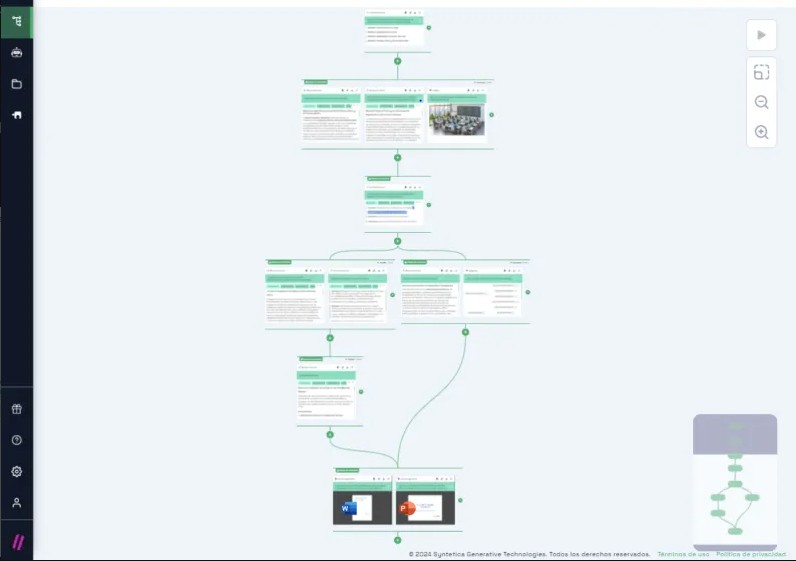
Syntetica is a content generation tool powered by artificial intelligence that allows you to create various types of content quickly and easily. To start using Syntetica, first, access the tool and navigate to the "Generators" section, then click on the "New Generator" button. This will open a workspace where you can begin adding blocks that will define the content you want to generate.
Once in the workspace, you can add content blocks by clicking on the "+" symbol that appears in the center of the area. Clicking this will open a menu where you can select the type of block to add. For example, you can choose the "Text" type and provide a generation instruction, such as "Propose an idea for a themed party." Next, click the "Add" button to allow Syntetica to generate the content based on your instruction. You can continue adding more blocks in this manner and configure each block to relate to the previous ones, creating more complex and coherent content.
In addition to generators, Syntetica also includes an agents section, which works similarly to a chatbot. Through this feature, you can directly chat with an AI agent and upload specific documentation for the agent to use to generate more accurate and relevant responses. For example, if you need the agent to generate a business proposal based on specific data from your company, you can upload the relevant documents and then request the agent to use them as a reference to create the content. This approach is particularly useful for dynamic interactions where you need quick, contextual responses based on detailed information.
Syntetica's Core Features
Design and repeatable automated processes.
Customizable workflow creation.
Automated generation of complex documentation.
Precise context control for optimal quality.
Generación dinámica de múltiples bloques de contenido.
Syntetica's Use Cases
#1
Presentations: Develop attractive and well-structured presentations using AI.
#2
SEO Content: Creation of SEO-optimized content using AI.
#3
Courses: Creation of educational courses using AI.
#4
Blogs: Write blog articles with relevant and well-documented information using AI.
#5
Technical Specifications: Drafting technical specification documents using AI.
#6
Proposals: Generate detailed documentation for a commercial proposal using AI.
#7
LegalTech: Automatic production of personalized contracts using AI.
Syntetica Support Email & Customer service contact & Refund contact etc.
Here is the Syntetica support email for customer service:
info@syntatica
.
More Contact, visit
the contact us page(https://syntetica.ai/contact)
Syntetica Company
Syntetica Company name:
Syntetica Generative Technologies SL
.
Syntetica Company address:
.
More about Syntetica, Please visit
the about us page()
.
Syntetica Login
Syntetica Login Link:
https://syntetica.ai/
Syntetica Sign up
Syntetica Sign up Link:
https://syntetica.ai/create_account/
Syntetica Pricing
Syntetica Pricing Link:
https://syntetica.ai/plans
Syntetica Youtube
Syntetica Youtube Link:
https://www.youtube.com/@Syntetica-ai
Syntetica Tiktok
Syntetica Tiktok Link:
https://www.tiktok.com/@syntetica.ai?_t=8oGPKnuFOM5&_r=1
Syntetica Linkedin
Syntetica Linkedin Link:
https://www.linkedin.com/company/syntetica-ai
Syntetica Twitter
Syntetica Twitter Link:
https://twitter.com/syntetica_ai
Syntetica Instagram
Syntetica Instagram Link:
https://www.instagram.com/syntetica.ai/